Key takeaways:
- Gamma is super simple for building a site with just a prompt
- No coding or design skills needed, just describe your idea
- Free version is fast but comes with some small limits
So, you want a website but you don’t want to mess with coding, design, or picking from a million AI tools? Same. It’s wild how many options are out there now. Some people use ChatGPT or Gemini to spit out code, but honestly, that’s still a lot of copy-paste and tweaking. If you’re like me and just want to type in what you want and get a good-looking site in minutes, I’ve got something to show you.
There’s this tool called gamma.app that makes the whole process painless. You can build a professional site for your business, portfolio, or whatever just by typing a sentence or two. No tech skills, no design headaches, no picking colors unless you want to. I’ll walk you through how I use it, what you get for free, and what to expect if you want to publish your site for the world to see.
Why Gamma Is My Go-To for Fast AI Website Creation
I’ve tried a bunch of AI website builders. Most claim they’re the easiest, but gamma.app actually delivers. You just head to their site, make an account, and you’re ready to roll. Hit “create new,” and you’ll see options: start from text, import a file, or use a URL. For most people, just type what your site is about. That’s it.
If you want a portfolio for your YouTube channel, just write: “Portfolio website for a YouTube channel called ASP Guide that provides updates on various popular AI tools, tutorials, and general AI stuff.” You don’t have to say anything about the design, layout, or colors. The AI figures it out.
Step-by-Step: From Prompt to Published Site
- Go to gamma.app and log in
- Click “create new”
- Pick the “web page” option (it can also do docs, presentations, and social posts)
- Type your prompt, like “Landing page for my freelance design services”
- Choose how many sections (called “cards”) you want—free users get up to 10
- Pick your language (English, but there are others)
- Click “generate outline” to see the structure
- Edit any text or add new sections if you want
- Pick a style (simple, bold, etc.)
- Decide how much text you want per section (brief, medium, detailed)
- Add images—either upload your own or let the AI generate illustrations
- Choose the AI model for images (Flux and Imag are solid for free)
- Click “generate” and watch your site come together in real time
You literally see the site being built, section by section. That’s way more satisfying than staring at a loading spinner.
Customizing Your AI-Generated Website
After the site is built, you can:
- Change text, icons, and images
- Add or remove sections
- Switch themes for a different vibe
- Add more pages if you want a multi-page site
The interface is super clean. If you’ve ever tried WordPress, Webflow, or Elementor and felt lost, you’ll appreciate how chill this is. You don’t need to touch code or mess with complicated settings.
What’s Up with “Cards” and Sections?
Each “card” is basically a section—think hero, about, services, contact, etc. You can have one for a super simple site or up to ten on the free plan. If you want more, there’s a paid upgrade, but honestly, most personal or small business sites don’t need more.
Publishing Your Site: What to Expect
Once you’re happy, hit publish. Your site goes live instantly. With the free version, your domain is generic (like gamma.site/yourname) and there’s a small watermark in the corner. If you want your own custom domain and no branding, you’ll need to pay, but for quick projects or proof-of-concept, the free version is fine.
If you want to know more about picking the right web host or domain, check out how to choose the right web host for your website’s needs.
Real-World Examples and Use Cases
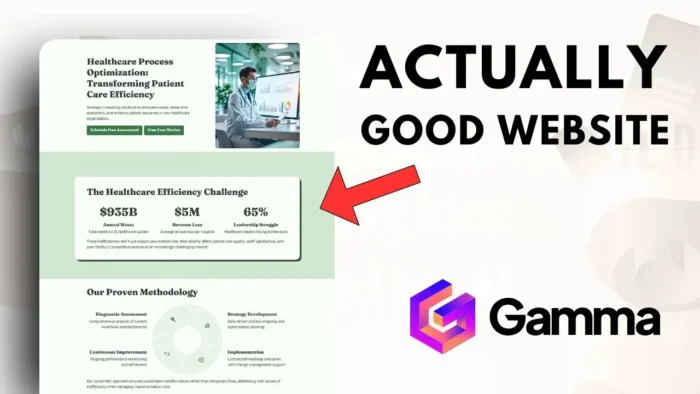
I’ve spun up a healthcare site, a photography agency page, and a portfolio for a YouTube channel—all in under five minutes each. The results? Clean, modern, and professional. The AI even throws in animations and color schemes that actually look good.
If you want to add a subscribe button to your YouTube channel, you can do it with a guide like how to add a subscribe button in Twitch—the concept is similar for most platforms.
What Makes Gamma Different from Other AI Builders?
Here’s what stands out for me:
- Real-time building—you see every change as it happens
- Super simple interface, no learning curve
- Built-in AI image generation, so you don’t have to hunt for stock photos
- Multi-purpose: not just websites, but also docs, slides, and social graphics
If you ever need to add clickable links to your YouTube video description, check out how to add clickable links to YouTube video description.
Limitations and Things to Know
- Free plan has limits: up to 10 sections, generic domain, watermark
- Custom domains and premium features cost extra
- Not for super complex sites—think landing pages, portfolios, small business, not e-commerce
If you’re looking to make your site private or want to know how to hide certain elements, see how to make your WordPress site private.
Quick Table: Gamma vs Traditional Site Builders
| Feature | Gamma (AI) | WordPress/Webflow |
|---|---|---|
| Coding needed | No | Sometimes |
| Design skills needed | No | Yes (for custom look) |
| Time to launch | 5 minutes | 1-2 hours+ |
| Free version | Yes | Yes |
| Custom domain | Paid | Yes (with setup) |
| Watermark | Yes (free) | No |
| Multi-purpose | Yes | Mostly websites |
FAQs
How many sections can I add for free?
Free users get up to 10 “cards” or sections. That’s usually enough for a simple site.
Can I use my own images?
Yep, you can upload your own or let the AI generate some for you.
Is there a watermark on the free version?
Yes, there’s a small watermark in the corner and a generic domain.
Do I need to know any code?
Nope, just type your prompt and tweak the text if you want.
Can I use Gamma for more than just websites?
Absolutely—it can make presentations, documents, and social posts too.
So if you want a site fast, with no fuss, give gamma.app a shot. It’s the easiest AI tool I’ve used for this, and it’s honestly kind of fun to watch your site come together in real time. 🚀