Key takeaways:
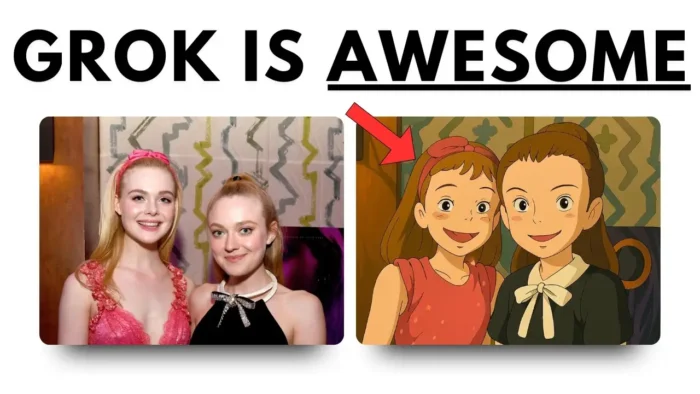
- Grok AI can make your photos look like Studio Ghibli art in seconds.
- It’s faster than GPT-4 and lets you generate more images for free.
- Upload your image, use a prompt, and get your anime-style result—no fuss.
Turning your own photos into Studio Ghibli style art is trending right now, but most people think you need fancy tools or paid accounts to pull it off. If you’ve tried GPT-4, you know the wait can be long, and free users get only a few shots a day. Grok AI changes the game, letting you create those dreamy anime looks in just seconds—no limits, no hassle.
In this post, I’ll show you step by step how to use Grok AI to turn any image into Studio Ghibli style. I’ll break down the process, share some prompt tips, and compare the results with GPT-4. Ready to give your photos a magical anime twist? Here’s how I do it.
Getting Started with Grok AI for Image Generation
Signing up is super simple. Just head to grok.com and sign up with your email, Google, or X account. Once you’re in, you’ll see a clean interface that’s way easier to use than the X version. I prefer the website version because it’s less cluttered and gives you more features.
Uploading Your Photo and Setting the Prompt
Now, start a new conversation. Click the upload button and choose your photo. For the prompt, you can use something like:
“Turn this photo into a Studio Ghibli style illustration.”
I’ve tried a few prompt variations, but the simpler, the better. If you want to experiment, try adding details like “soft lighting” or “anime background.” You can copy and paste the prompt directly—no need to overthink it.
If you’re working with files and want to know how to move them around, check out how to transfer photos from email to USB stick.
How Fast Is Grok AI Compared to GPT-4?
Speed is where Grok AI really shines. With GPT-4, you might wait five minutes for a single image. Grok AI usually delivers results in just a few seconds. Plus, there’s no daily limit for free users, so you can keep experimenting until you get the look you want.
If you’re dealing with big files or want to move lots of images, you might want to read how to transfer big files to USB stick.
Comparing Grok AI and GPT-4 Results
I ran the same photo through both Grok AI and GPT-4 using the exact same prompt. Here’s what I noticed:
| Feature | Grok AI | GPT-4 |
|---|---|---|
| Speed | Seconds | Minutes |
| Free Images | Unlimited | 3/day |
| Anime Accuracy | More faithful to Studio Ghibli | Sometimes generic |
| Interface | Clean, simple | Can be slow |
For real photos, Grok AI nails the Ghibli vibe better. For cartoons (like Family Guy), results can get weird—sometimes even changing character features in odd ways. GPT-4 sometimes does better with cartoon-to-anime conversions, but for real people, Grok is my pick.
If you’re curious about fixing or editing your images after generation, check out how to fix pixelated photos.
Prompt Tips for Best Studio Ghibli Results
- Keep your prompt short and clear.
- Add “anime style” or “Studio Ghibli style” for best results.
- If you want a softer look, mention “soft colors” or “gentle background.”
- For portraits, focus on “face in Studio Ghibli style.”
You can save your favorite prompts in a text file or note app. If you want to organize your files, see how to create a new folder in Google Drive.
What to Do If Your Image Doesn’t Look Right
Sometimes Grok AI gets creative—maybe too creative. If your photo looks off, try these:
- Use a different prompt.
- Crop your photo to focus on faces or main objects.
- Try a higher-resolution image.
- If converting a cartoon, results may vary. Real photos work best.
If you need to resize your image before uploading, here’s how to resize picture on PC.
Saving and Sharing Your Studio Ghibli Image
Once you get your result, just right-click and save the image. Share it on social, use it as a profile pic, or print it out. If you want to upload your new art to Instagram, check out how to upload photo to Instagram from PC.
If you want to keep your images organized or move them to a flash drive, here’s how to transfer files from tablet to USB flash drive.
Troubleshooting: Grok AI Not Working or Slow?
If Grok AI seems slow or images aren’t generating:
- Refresh the page or try a different browser.
- Check your internet connection.
- Log out and log back in.
- Try a smaller image file.
If you’re having tech issues, sometimes clearing your browser cache helps. Here’s how to clear cache Windows 10.
Extra: Using Grok AI on X (Twitter)
You can use Grok AI on X too, but the web version just feels better. The interface is cleaner and you get more control. If you want to share your art directly on social, just download from Grok and upload to your feed.
Final Thoughts
Turning your photos into Studio Ghibli style is way easier with Grok AI. It’s fast, free, and the results are pretty close to the real thing—at least for real-life images. If you want to try other styles or edit your results, there are plenty of free tools out there. Have fun and don’t be afraid to experiment!
FAQs
How do I sign up for Grok AI?
Just go to grok.com and sign up with your email, Google, or X account. Takes less than a minute.
What’s the best prompt for Studio Ghibli style?
Try “Turn this photo into a Studio Ghibli style illustration.” You can tweak it with extra details if you want.
Can Grok AI handle cartoon images?
It can, but results can be weird. Works best with real photos.
How fast is Grok AI compared to GPT-4?
Grok AI usually takes seconds, while GPT-4 can take minutes for each image.
Where can I save or move my generated images?
You can save them to your PC, upload to social, or move them to a USB stick. If you need help, see how to transfer photos from email to USB stick.