Key takeaways:
- Always use Pro Mode and web search for better results
- Try different AI models and rewrite answers for accuracy
- Take advantage of unlimited uploads, image generation, and mobile features
Ever feel like you’re not using your Perplexity Pro subscription to its full potential? I’ve been there. With so many features packed in, it’s easy to miss out on some cool stuff. Here’s my rundown of what actually works, what saves time, and how to make Perplexity Pro worth every penny.
Table of Contents
- Always Enable Pro Mode and Web Search for the Best Results
- Use Reasoning Models for Deep Dives, but Be Patient
- Rewrite and Re-Model Your Prompts for Better Answers
- Generate Images with AI—Don’t Sleep on This Feature
- Set Perplexity as Your Default Search Engine
- Try the Mobile App for Voice Features
- Use Your $5 Sonar API Credit for Projects
- Upload Unlimited Documents and Images
- Create and Publish Pages Like a Wiki
- Summarize News and Fact-Check Instantly
- Bonus: More Features and What’s Coming
- FAQs
- How do I enable Pro Mode and web search in Perplexity?
- What’s the difference between the reasoning models?
- Can I generate images on Perplexity?
- Is there a limit to document uploads?
- What if I cancel my Pro subscription?
Always Enable Pro Mode and Web Search for the Best Results
If you want the freshest, most relevant info, always toggle on Pro Mode. This makes Perplexity read three times more pages from the web. Combine that with the web search feature, and you’re getting answers that aren’t just stuck in the AI’s memory—they’re current and on point. If you need academic or social sources, those options are there too, but honestly, web mode usually nails it.
Use Reasoning Models for Deep Dives, but Be Patient
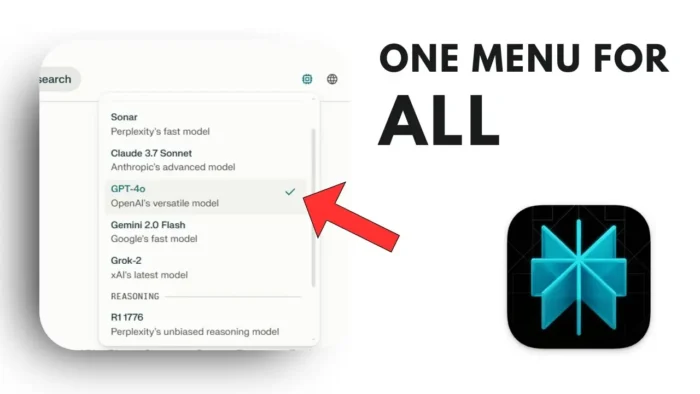
Sometimes you need more than a quick answer. That’s where the reasoning models come in. You’ve got options like deep R1, O3 mini from OpenAI, and Claude 3.7 Sonnet. These break down your question and analyze it for a more accurate response. They’re slower—sometimes a few minutes—but if you’re researching something serious, it’s worth the wait. I’ve found Claude 3.7 Sonnet to be the fastest among them, but which one is “best” really depends on your question.
Rewrite and Re-Model Your Prompts for Better Answers
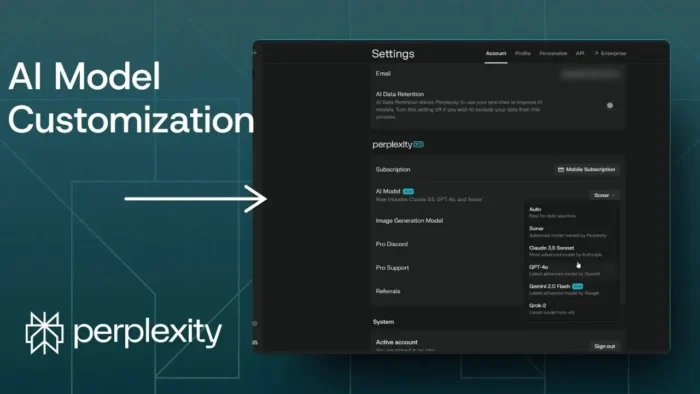
One of my favorite tricks: if you don’t like the answer, just rewrite it with another model. Maybe you started with GPT-4o and it missed the mark—switch to Claude 3.7 Sonnet or another model and see how the answer changes. Each model has its own strengths, so play around until you get what you need.
Generate Images with AI—Don’t Sleep on This Feature
Yeah, Perplexity isn’t just for text. You can generate pictures too! The Flux One model from Black Forest Lab is my go-to for images, but there’s also DALL·E and Playground v3 if you want to experiment. To use image generation, start a thread, search for images, and then hit the generate image button. You can choose the style or use a custom prompt for something specific.
If you’re into editing or need to resize your images after generating them, check out how to resize picture on PC for a quick fix.
Set Perplexity as Your Default Search Engine
Why keep bouncing between Google and Perplexity? Install the Perplexity AI Search Chrome extension. Once it’s set up, any search you type in your browser’s address bar goes straight to Perplexity. I’ve found the results often more useful than what I get from Google. If you want to tweak your Chrome settings, here’s how to change Chrome default download location.
Try the Mobile App for Voice Features
The Perplexity mobile app has some cool extras. You can talk to the AI using your voice and get answers read back to you in a natural-sounding voice. It’s only on the mobile app (Android or iOS), but it’s super handy when you’re on the go.
Use Your $5 Sonar API Credit for Projects
Every Pro user gets $5 in Sonar API credit each month. If you’re into automation or building projects, you can use this credit to connect Perplexity with tools like make.com. Automate social media posts, generate content for your site, or whatever else you dream up. If you’re looking to save money on software, I’ve got a guide on how to save money and reduce costs on software services.
Upload Unlimited Documents and Images
Pro users get unlimited uploads. Toss in PDFs, Word docs, images, code—anything. Then ask Perplexity questions based on your files. I’ve used it to analyze code, summarize documents, and even count people in a photo. Sometimes the answer depends on the model you pick, so if it’s off, try another one.
If you ever run into issues with file sizes, you might want to read how to fix file too large for USB drive.
Create and Publish Pages Like a Wiki
With Pro, you can create your own pages—think of them as mini Wikipedia articles, all generated by AI. You curate the content, maybe add some images, and then publish. These pages stay even if you cancel your subscription (you just can’t make new ones). Great for sharing research, reports, or even promoting your business.
Summarize News and Fact-Check Instantly
Need a quick rundown of what’s happening in tech, AI, or any topic? Ask Perplexity to summarize the news for you. You can specify a time frame or a company. If you want to make sure the info is legit, use the built-in fact-check tool. Just select the text and hit “check sources.” It’ll pull up links or tell you if the info is sketchy. The feature’s still new, so sometimes it doesn’t find sources, but it’s getting better.
Bonus: More Features and What’s Coming
Perplexity keeps rolling out new stuff—like the Comet browser, which will bring even more ways to use the AI. I’ll be testing it as soon as it drops.
FAQs
How do I enable Pro Mode and web search in Perplexity?
Just toggle Pro Mode and Web Search at the top of your search window. This makes Perplexity pull info from more sources and keeps answers fresh.
What’s the difference between the reasoning models?
Deep R1, O3 mini, and Claude 3.7 Sonnet all break down your question for deeper analysis. Claude 3.7 Sonnet is usually the fastest, but results vary by topic.
Can I generate images on Perplexity?
Yep! Start a new thread, search for images, and use the generate image button. Choose your style or write a custom prompt.
Is there a limit to document uploads?
Nope, Pro users get unlimited uploads—PDFs, images, code, whatever you need.
What if I cancel my Pro subscription?
You keep any pages you’ve created, but you won’t be able to make new ones until you resubscribe.
That’s pretty much how I use Perplexity Pro every day. If you want to make the most of your tools, try out these features and see what fits your workflow. Got any hacks of your own? Drop them in the comments or reach out! 🚀