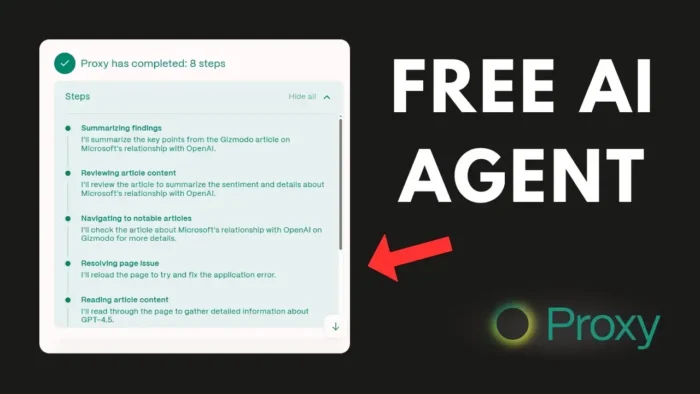
Key takeaways:
- Proxy from Convergence.ai lets you build AI agents with just prompts
- Agents can browse, interact, and report like a human
- Templates make it easy to start, but some tasks will need patience
So, you keep hearing about AI agents everywhere, right? The buzz is real, and now it’s not just for big tech companies. With tools like Proxy from Convergence.ai, anyone can spin up an agent that acts like a real person online. These bots don’t just spit out text—they actually browse, click, and interact with websites. This post breaks down how it works, what you can do, and what to expect if you try it yourself. If you’re tired of basic AI chat and want something that does the heavy lifting, this is for you.
Proxy by Convergence.ai: What Makes It Different from Regular AI Chatbots
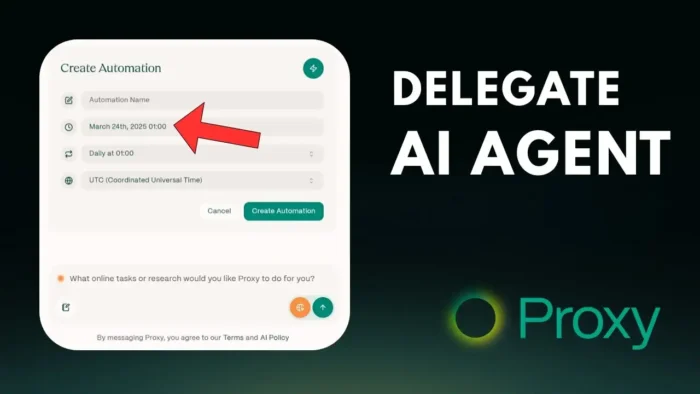
Proxy isn’t your average AI chatbot. Instead of just answering questions, it acts like a human on the web. You give it a prompt, and it opens up a browser, clicks links, fills out forms, and grabs info. It’s like hiring a virtual assistant that doesn’t sleep.
You can ask it to:
- Visit a website and analyze its layout
- Research across multiple sites
- Google stuff and report back
- Even check your own YouTube channel and give you feedback
The cool part? It’s free for now. You just sign up at convergence.ai and get started. Heads up, though—it probably won’t stay free forever, so get in while you can.
The Dashboard: Familiar but Powerful
Once you log in, the dashboard feels a bit like ChatGPT. You’ve got your prompt history on the left, a chat window, and a section for templates. The Template Hub is where things get spicy. It’s a collection of ready-made prompts for common tasks, so you don’t have to start from scratch.
If you want to make your own, just open a new chat and type your prompt. For example, you can ask the agent to review your YouTube channel and suggest five ways to improve your last 10 videos. Drop in your channel link, and the agent gets to work.
What Happens When You Run a Task
Once you hit send, Proxy fires up a real browser session. You’ll see screenshots as it browses, clicks, and collects info. It’s not instant—sometimes it takes a while, so don’t sit and stare at the screen. Go make coffee, walk the dog, whatever. When it’s done, you get a report with actionable feedback.
For example, when I asked it to review a YouTube channel, it gave tips like:
- Keep your thumbnails consistent
- Ask more questions to boost engagement
- Write better, SEO-friendly descriptions
- Keep videos concise, especially tutorials
- Try more topic variety (though, honestly, niche is usually better for channels)
Some suggestions hit, some miss. That’s AI for you. Still, it’s a solid starting point if you want a quick audit.
Proxy vs. Other AI Tools: What’s the Difference?
Here’s a quick table to show how Proxy stacks up against the usual suspects:
| Feature | Proxy (Convergence.ai) | ChatGPT | Perplexity | |
|---|---|---|---|---|
| Web browsing | Yes | No | Yes | Yes |
| Clicks/Interacts | Yes | No | No | No |
| Visual analysis | Yes | No | No | No |
| Custom prompts | Yes | Yes | Yes | No |
| Free tier | Yes (for now) | Yes | Yes | Yes |
Proxy’s main edge is acting like a human—clicking, scrolling, and seeing images, not just reading text.
Using the Template Hub for Fast Results
Template Hub is a lifesaver if you don’t want to write prompts yourself. It’s a library of pre-built tasks, like:
- Checking news about a brand
- Reviewing social media stats
- Researching product prices
You just pick a template, fill in the blanks (like brand name or date range), and run it. The downside? You can’t edit the core prompt, just the variables. Still, for most people, that’s enough to get started.
Real-World Limitations: Where Proxy Struggles
Proxy is cool, but it’s not magic. Some things trip it up:
- Websites with CAPTCHA (those “I’m not a robot” puzzles)
- Pages that don’t load right or block bots
- Complicated site layouts designed for humans, not bots
If Proxy gets stuck, it might ask you to solve a CAPTCHA for it. You can intervene and help, but it’s a reminder that AI agents still have a long way to go. Most websites are built for people, not robots, so expect hiccups.
If you’re curious about how to save a web page for offline use, check this guide: how to save a web page on Chrome Android and open it offline. This can come in handy if Proxy grabs something you want to keep.
Example Tasks You Can Try with Proxy
Want to see what Proxy can do? Here are some ideas:
- Ask it to find the latest news about OpenAI from the last three days
- Have it check the price of a Tesla Model 3 on the official site
- Tell it to find top TikTok videos with over 1 million views
- Get it to review your own website or channel for quick feedback
Just remember, some sites will block bots or throw up CAPTCHAs. If you’re dealing with YouTube, you might want to learn how to download YouTube videos from all devices or how to find your comments on YouTube for more manual control.
How to Build Your Own Template and Prompt
If you want more control, skip the templates and write your own prompt. Here’s how:
- Open a new chat
- Type your request clearly (“Review my website and list five ways to improve user engagement”)
- Add any links or details
- Hit send and let Proxy work
Proxy will show you screenshots as it goes, so you can follow along or step in if it gets stuck.
Waiting for Results: Patience Needed
Proxy isn’t fast. Some tasks take a while, especially if the agent has to visit multiple pages or dig deep. Don’t stress—just let it run in the background. If you need to speed up your own browsing, check out 7 tips to make Chrome faster.
The Future of AI Agents: What’s Next?
Right now, Proxy is a sneak peek at where AI agents are headed. One day, websites might have special protocols to make things easier for bots. For now, Proxy is a solid tool for simple research, audits, and data collection. If you’re cool with occasional glitches, it’s a fun way to automate boring web tasks.
FAQs
How do I sign up for Proxy by Convergence.ai?
Just head to convergence.ai, create a free account, and you’re in. No credit card needed right now.
Can Proxy solve CAPTCHAs on its own?
Nope. If it hits a CAPTCHA, it’ll ask you to solve it manually.
Is Proxy better than ChatGPT or Perplexity for research?
If you need real web interaction—clicks, screenshots, visual analysis—Proxy wins. For pure text Q&A, ChatGPT and Perplexity are quicker.
Can I edit the templates in Template Hub?
You can change variables (like keywords or dates), but you can’t rewrite the core prompt.
Will Proxy always be free?
Probably not. It’s free now, but running these agents is expensive, so expect paid plans soon.
Ready to try building your own AI agent? Proxy makes it as simple as typing what you want and letting the bot do the rest. If you want to get more out of your YouTube or web projects, check out how to automatically skip YouTube ads or how to make and build custom YouTube video playlists for more control over your content. 🚀