Key takeaways:
- Switch to Light mode from the desktop settings
- Some apps or sites might need a refresh to update the theme
- Auto mode can switch between Light and Dark based on time
Feeling lost in Dark mode on your Chromebook? 😵💻 Sometimes that moody look is just too much, especially if you’re reading or working during the day. If you’re ready for a brighter vibe, I’ll show you how to flip your Chromebook back to Light mode in seconds.
This quick guide is all about making your Chromebook look normal again—no more dark backgrounds everywhere. I’ll walk you through the steps, share a few extra tips, and even cover what to do if some apps don’t switch right away.
Table of Contents
- How to switch your Chromebook from Dark mode to Light mode
- What to do if some apps or sites stay dark
- Why some people love Light mode (and when Dark mode is better)
- Step-by-step: Changing Chromebook theme settings
- What if my Chromebook doesn’t have these options?
- Extra tips for Chromebook customization
- Table: Theme Options on Chromebook
- FAQs
- How do I turn off Dark mode on my Chromebook?
- Why do some apps stay in Dark mode after I switch?
- What’s the Auto theme on Chromebook?
- Can I change individual app themes on Chromebook?
- What if I don’t see the theme settings?
How to switch your Chromebook from Dark mode to Light mode
So, your Chromebook is stuck in Dark mode and everything—apps, websites, menus—looks gloomy. Here’s how I get it back to Light mode:
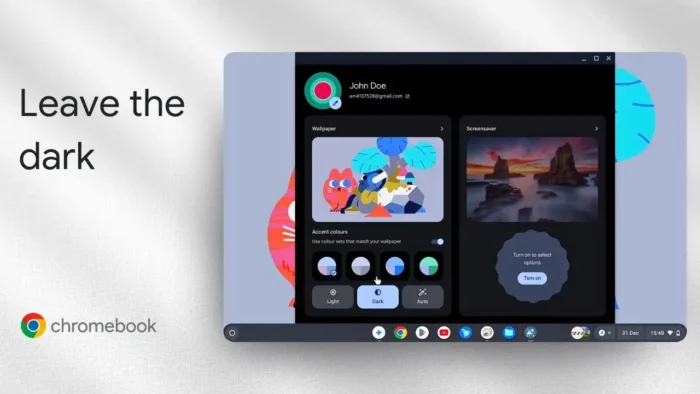
- Right-click on your desktop (just tap with two fingers on your trackpad if you don’t have a mouse).
- Click “Set wallpaper & style.”
- You’ll see options for Dark, Light, and Auto. Pick Light.
- The whole system theme flips to Light mode instantly.
If you’re curious about the Auto option, it’s pretty smart. It’ll keep your Chromebook in Light mode during the day and switch to Dark mode at night. This is perfect if you want your eyes to chill out after sunset but still want a bright look during work hours.
What to do if some apps or sites stay dark
After you switch, most apps and sites will follow the new theme. But sometimes, you’ll notice a few stubborn ones that don’t get the memo. Just refresh the page or restart the app. If you’re using something like the Gemini app, close it and open it again—you should see the new theme right away.
If you’re running into issues with Chrome itself, or you want to reset other display tweaks, check out how to reset Google Chrome to its default settings.
Why some people love Light mode (and when Dark mode is better)
I’m a fan of Dark mode for late-night browsing or when I’m in a low-light room. But for most web browsing, reading, or working with documents, Light mode just feels easier on the eyes. Plus, some websites and apps look weird or even harder to read in Dark mode.
If you want to tweak your Chromebook’s look even more, you can also change your Chromebook wallpaper or adjust your mouse cursor color.
Step-by-step: Changing Chromebook theme settings
Here’s the quick breakdown:
- Right-click the desktop
- Choose “Set wallpaper & style”
- Select Light, Dark, or Auto
- Refresh any apps or sites that don’t update
If you want to see how it’s done visually, the YouTube video linked above shows the steps in real time.
What if my Chromebook doesn’t have these options?
If your Chromebook is running an older version of Chrome OS, you might not see the Light/Dark/Auto options. In that case, try updating your OS. Here’s a handy guide on how to check your Chromebook version.
Extra tips for Chromebook customization
- Want to save battery? Tips to save battery on Chromebook
- Need a bigger font? How to increase font size on Chromebook
- Want to go full minimalist? How to hide files on Chromebook
Table: Theme Options on Chromebook
| Option | What it does | When to use it |
|---|---|---|
| Light | Bright background, dark text | Daytime, reading |
| Dark | Dark background, light text | Night, low-light rooms |
| Auto | Switches based on time of day | All-day use |
FAQs
How do I turn off Dark mode on my Chromebook?
Right-click the desktop, hit “Set wallpaper & style,” and pick Light.
Why do some apps stay in Dark mode after I switch?
Some apps need to be refreshed or restarted to update the theme.
What’s the Auto theme on Chromebook?
Auto switches between Light and Dark based on the time of day.
Can I change individual app themes on Chromebook?
Most apps follow the system theme, but some have their own settings.
What if I don’t see the theme settings?
Update your Chromebook to the latest version to get the newest features.
Ready for a brighter Chromebook? Flip that theme and enjoy the light! 😎 For more Chromebook tricks, check out how to get your Chromebook out of dark mode or how to enable dark mode on Chromebook.