Key takeaways:
- GPT-4o can generate images and text, not just chat.
- You can make creative, detailed, and accurate images—even with text.
- Styles, UIs, infographics, and transparent PNGs are all possible.
OpenAI’s new GPT-4o just dropped, and the hype is real. Now you can make wild images straight from ChatGPT, not just text. This update is rolling out for both free and paid users, but not everyone has it yet. If you’re still stuck with DALL-E, hang tight—full rollout is coming soon.
Table of Contents
- GPT-4o’s Multimodal Power Means Images and Text Together
- Text in Images Is Actually Good Now
- Try On Clothes Virtually—No More Guessing
- Style Transfer: Turn Your Photos Into Art
- UI Design and Creative Inspiration for Developers
- Multiple Art Styles, All in One Click
- Infographics That Don’t Suck
- Transparent PNGs and Sprites for Games
- Color Control for Designers
- Real-World Uses: Ads, Marketing, and Memes
- Edit Images After Creation
- GPT-4o vs Midjourney, Flux, Reef, and Grok
- How to Get Started with GPT-4o Image Generation
- Tips for Better Results
- FAQs
- Can GPT-4o generate images for free?
- How do I add text to my GPT-4o images?
- Can I make transparent PNGs with GPT-4o?
- What styles can GPT-4o create?
- Can I edit images after they’re made?
GPT-4o’s Multimodal Power Means Images and Text Together
So here’s the deal: GPT-4o is a multimodal model, which means it can handle both text and images. That’s why you can now ask it for a picture, not just a paragraph or code snippet. For a while, OpenAI kept this feature under wraps while they worked out the kinks. Now, the update is out, and you might already see the new image button in your ChatGPT window.
If you’re still waiting for access, don’t stress. It’s rolling out in waves. You’ll get it soon, and it’s available for both free and paid ChatGPT users. That’s a big shift from the old days when image generation was locked behind a paywall or separate tool.
Text in Images Is Actually Good Now
Let’s talk about the first thing that blew my mind: GPT-4o actually nails text in images. If you’ve ever tried to make an airline ticket or a fake ID with DALL-E or Midjourney, you know the struggle—letters get all jumbled, fonts switch mid-word, and nothing looks real.
With GPT-4o, you get:
- Clean, readable text (upper and lower case in the right spots)
- Consistent fonts across the whole image
- Accurate positioning, so things look like they belong
This is huge if you want to make infographics, mockups, or anything where text matters. If you’re into making infographics for marketing or social media, this is the tool you want. You can even generate accurate, sharp infographics that look like a real designer made them.
Want to save those images for later or use them in another app? Check out how to save images from Instagram on PC or how to save Google images on Chromebook.
Try On Clothes Virtually—No More Guessing
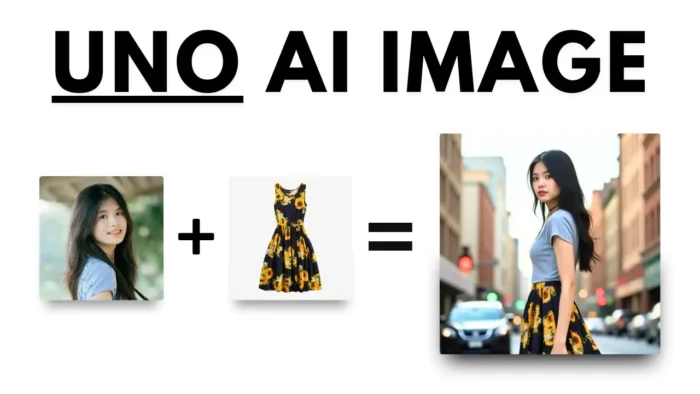
This one’s for all the online shoppers. You can upload a photo of yourself and ask GPT-4o to show you wearing a new outfit. It’s not just a generic model—it’s your face, your body, your vibe. So before you drop cash on that wild jacket, see how it looks on you first.
Style Transfer: Turn Your Photos Into Art
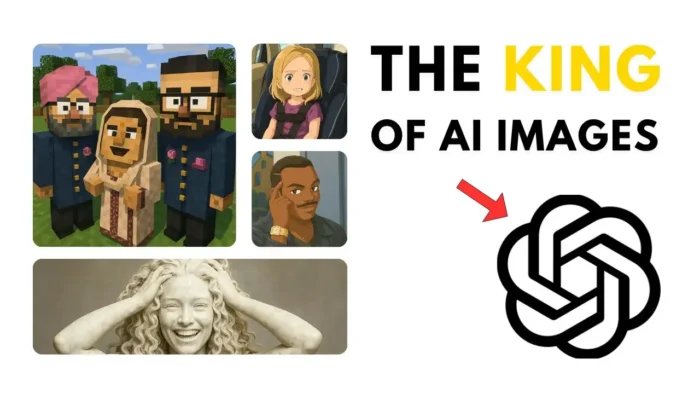
You want to see yourself as a Roman statue? Or maybe in Studio Ghibli style? GPT-4o can do that. Just upload a photo and ask for a style transfer. The AI handles the textures, colors, and details so well, it almost looks real.
If you’re into retro looks, you can even make 8-bit art. Here’s a guide for making 8-bit art in Microsoft Excel if you want to mix old-school with new-school.
UI Design and Creative Inspiration for Developers
If you’re a designer or developer, you can ask GPT-4o to generate user interface mockups. Need a new app layout? Want to see a dashboard in a specific color palette? Just describe what you want, and the AI spits out a fresh design. You can even specify color codes for total control.
If you’re building a site or app, you might want to insert an image into a table cell in WordPress or add clickable links to YouTube video descriptions.
Multiple Art Styles, All in One Click
This is where things get wild. You can ask for the same subject in different styles:
- Cartoon
- Studio Ghibli
- 3D
- Minecraft
- And more
Just type your prompt and pick a style. Want an infographic in Studio Ghibli style? Or your pet as a Minecraft character? It’s all possible.
Infographics That Don’t Suck
Making infographics used to be a pain. Now, just describe what you want, and GPT-4o generates a clean, accurate, and readable graphic. The text is sharp, the layout makes sense, and you can even tweak the colors.
If you need to save your infographic as a PDF, here’s how to save a picture as PDF.
Transparent PNGs and Sprites for Games
Tired of fake PNG sites? With GPT-4o, you can generate real transparent images. Just ask for a sprite or object with a transparent background, and you’re good to go. This is perfect for game devs or anyone making custom stickers.
Want to make your own sticker for WhatsApp? Here’s a quick guide on how to send your photo as a sticker on WhatsApp.
Color Control for Designers
You can tell GPT-4o to use a specific color code in your image. This is a lifesaver for branding, UI design, or anything that needs to match your palette. Just give the hex code, and the AI does the rest.
If you’re working in Photoshop, you might want to copy a color from a picture for even more control.
Real-World Uses: Ads, Marketing, and Memes
Companies are already using GPT-4o to make ads. The AI can generate product shots, banners, and even meme-style images that actually look good. The text is readable, the style matches the brand, and you can edit the image later if you want.
If you want to control the ads you see online, check out how to control ads on Google.
Edit Images After Creation
You’re not stuck with the first version. Send the image back to GPT-4o, and you can ask for edits—change the style, tweak the colors, or add new elements. It’s like having an AI Photoshop assistant.
If you want to do more with your images, try blurring a face in Filmora or removing fisheye distortion.
GPT-4o vs Midjourney, Flux, Reef, and Grok
Let’s compare. Midjourney is still great for pure art, but it struggles with text. Flux and Reef have their moments, but GPT-4o is way more accurate with prompts, especially when you need text and images together. Grok can edit photos, but GPT-4o is just more consistent and flexible.
Here’s a quick table for reference:
| Feature | GPT-4o | Midjourney | Flux | Reef | Grok |
|---|---|---|---|---|---|
| Text accuracy | ✅ | ❌ | ❌ | ❌ | ❌ |
| Style variety | ✅ | ✅ | ✅ | ✅ | ✅ |
| UI/Infographic creation | ✅ | ❌ | ❌ | ❌ | ❌ |
| Transparent PNG | ✅ | ❌ | ❌ | ❌ | ❌ |
| Edits after creation | ✅ | ❌ | ❌ | ❌ | ✅ |
How to Get Started with GPT-4o Image Generation
- Open ChatGPT and look for the image generation button.
- Type your prompt—be specific about style, colors, and text.
- Download or edit your image as needed.
If you’re new to AI art, check out how to unleash your creativity with AI art (yep, AI art is for everyone).
Tips for Better Results
- Be clear in your prompts. Specify style, color, and text.
- Upload reference photos for style transfer or virtual try-ons.
- Use color codes if you want brand consistency.
- Ask for transparent backgrounds for stickers or sprites.
- Don’t be afraid to ask for edits—GPT-4o is flexible.
If you need to resize your picture on PC or compress photos online, you’ve got options after you download your image.
FAQs
Can GPT-4o generate images for free?
Yes, both free and paid users can use image generation, but rollout is gradual.
How do I add text to my GPT-4o images?
Just include your text in the prompt. The AI handles fonts and positioning.
Can I make transparent PNGs with GPT-4o?
Yep, just ask for a transparent or PNG image in your prompt.
What styles can GPT-4o create?
You can pick from cartoon, Studio Ghibli, 3D, Minecraft, and more.
Can I edit images after they’re made?
Yes, upload the image back to ChatGPT and ask for changes—style, text, colors, whatever you want.
Ready to make your own wild images? Jump in and see what you can create with GPT-4o. It’s wild, it’s fun, and honestly, it’s only going to get better from here. 🚀